
DNS Change Monitoring: How to Detect DNS Changes Before They Cause Downtime
DNS changes almost never look dangerous at first. There’s no crash. No red alert. No obvious failure.
Instead, things start to “feel off”:
- a few users can’t access your site;
- emails arrive with delays;
- some integrations stop working.
And by the time someone reports it - the issue has already spread.
This is what makes DNS one of the most underestimated failure points in modern infrastructure.
Why DNS Changes Are So Hard to Catch
Unlike server outages, DNS issues don’t behave consistently.
They depend on:
- caching;
- propagation;
- geographic location;
- resolver differences.
What this means in practice:
- Your team sees everything working;
- Monitoring tools show uptime = 100%;
- But users in another region get errors.
DNS issues are fragmented and delayed. That’s why traditional monitoring often misses them completely.
What DNS Change Monitoring Actually Does
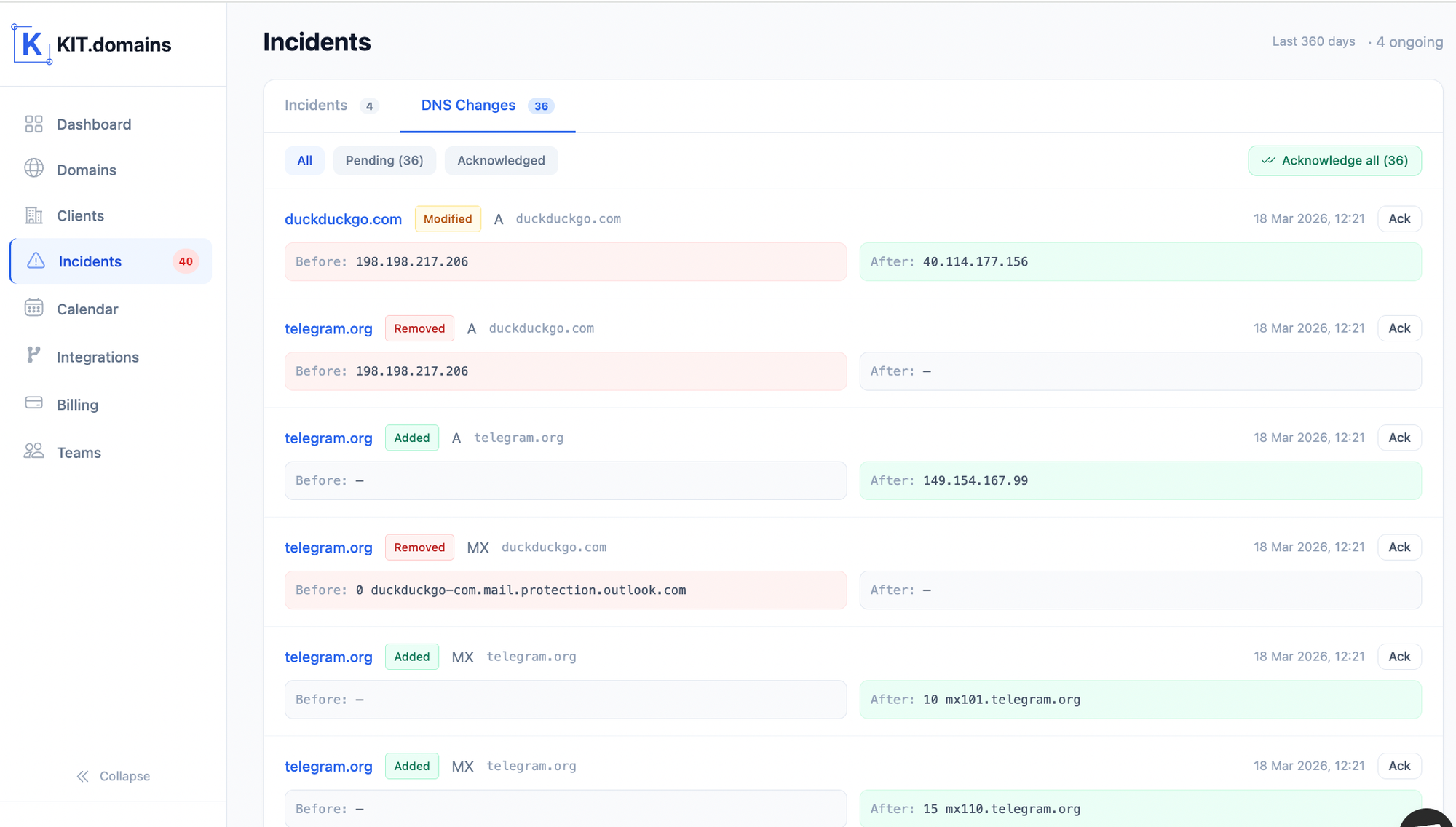
DNS change monitoring is not about uptime. It’s about detecting infrastructure drift.
Instead of checking: “Is the site online?”
It checks: “Did something change that could break the system?”
A proper DNS monitoring setup tracks:
- DNS record values;
- nameserver changes;
- routing destinations;
- record history over time.
The Types of DNS Changes That Break Systems
Not all changes are equal. Some are harmless. Others are catastrophic.
Critical DNS changes to monitor:
1. A / AAAA Records
Control where traffic goes. If changed:
- website goes down;
- or points to wrong server.
2. MX Records
Control email delivery. If changed:
- emails stop arriving;
- or get intercepted.
3. NS Records
Define DNS authority. If changed:
- full domain control can shift;
- all records can be altered.
4. CNAME Records
Used for integrations and subdomains. If changed:
- SaaS tools break;
- landing pages stop working.
5. TXT Records (SPF/DKIM)
Used for email authentication. If broken:
- emails go to spam;
- domain trust drops.
Real-World Scenarios (Where DNS Monitoring Saves You)
Scenario 1: The Invisible Email Outage.
A provider update modifies MX records. No alerts. No visible downtime. But:
- emails stop reaching inboxes;
- support tickets increase.
Without monitoring, this can go unnoticed for hours (or days).
Scenario 2: Partial Website Downtime.
Nameserver propagation fails after a registrar change. Result:
- some users see the site;
- others get DNS errors.
Looks like a “random bug” - but it’s DNS.
Scenario 3: Unauthorized DNS Change.
An attacker or compromised account modifies records. Result:
- traffic redirected;
- emails intercepted.
This is how DNS hijacking starts.
Why Manual DNS Monitoring Fails
Many teams still rely on:
- spreadsheets;
- periodic checks;
- registrar dashboards.
This breaks quickly because:
1. No real-time visibility
You only see issues after they happen.
2. No change detection
You don’t know what changed - only that something is broken.
3. No centralization
Domains live across:
- GoDaddy;
- Namecheap;
- Cloudflare;
- others.
There’s no single source of truth.
4. Doesn’t scale
What works for 5 domains fails at 50+.
How to Set Up DNS Change Monitoring (Step-by-Step)
Step 1: Create a DNS Baseline
Capture:
- all DNS records;
- current values;
- nameservers.
This becomes your reference.
Step 2: Monitor Continuously
DNS should be checked:
- automatically;
- consistently;
- without manual input.
This is where most setups fail.
Step 3: Detect Changes (Not Just Failures)
The system must detect:
- any modification;
- not just outages.
This is the difference between:
- reactive monitoring;
- proactive monitoring.
Step 4: Set Up Real-Time Alerts
Alerts must be:
- instant;
- actionable;
- visible to the team.
Best channels:
- Slack;
- Telegram;
- Webhooks;
- Email (secondary).
Step 5: Add Context to Alerts
A good alert includes:
- what changed;
- old value;
- new value;
- affected domain.
Without context = wasted time
Step 6: Centralize Everything
At scale, this is critical.
You need:
- one dashboard;
- all domains;
- unified alerts.
Otherwise you’re managing chaos.
Monitoring DNS Changes at Scale
As your infrastructure grows:
Complexity increases:
- more domains;
- more providers;
- more changes.
Risks increase:
- missed updates;
- unnoticed changes;
- delayed response.
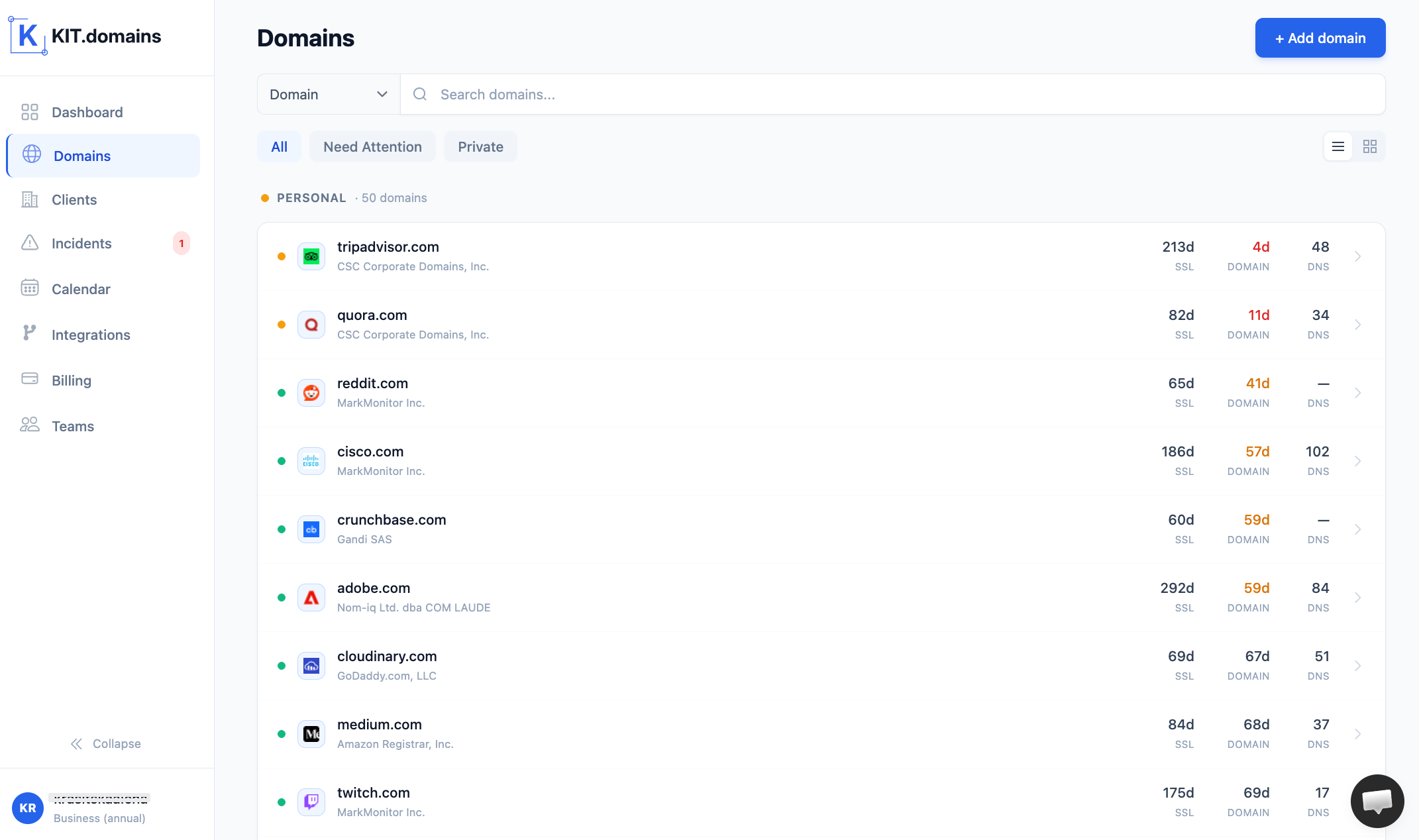
What scalable DNS monitoring looks like:
- bulk domain import;
- centralized dashboard;
- real-time detection;
- integrated alerts.
This is where teams move from:
manual control → system control
DNS Monitoring vs Uptime Monitoring
This is a common misunderstanding.
Uptime monitoring:
- checks availability;
- reacts after failure.
DNS monitoring:
- tracks changes;
- prevents failure.
You need both - but for different reasons.
DNS Monitoring vs DNS Security
DNS security:
- prevents attacks
DNS monitoring:
- detects changes
Monitoring is your early warning system.
Tools for DNS Change Monitoring
There are two approaches:
Custom scripts
Pros:
- flexible.
Cons:
- fragile;
- require maintenance;
- easy to break silently.
DNS monitoring platforms
Pros:
- automated detection;
- built-in alerting;
- centralized control.
Cons:
- require choosing the right tool.
A Practical Solution
Instead of building your own monitoring system, many teams use platforms like KIT.domains.
It’s designed specifically for:
- tracking DNS changes in real time;
- managing multiple domains;
- centralizing visibility;
- integrating alerts into workflows.
In practice:
- domains are imported in bulk;
- DNS baseline is created automatically;
- changes are detected instantly;
- alerts are sent via Slack, Telegram, or Webhooks.
No scripts. No maintenance. No blind spots.
DNS Monitoring Checklist
Use this to audit your setup:
- DNS baseline defined;
- key records monitored (MX, NS, A, CNAME);
- real-time alerts enabled;
- alerts integrated with team tools;
- all domains centralized;
- DNS history available.
Missing even one = risk.
Conclusion
DNS doesn’t fail loudly. It fails quietly, inconsistently, and often invisibly.
Without DNS change monitoring:
- issues go unnoticed
- users are impacted first
- teams react too late
With it:
- changes are visible
- alerts are immediate
- problems are prevented
That’s the difference between reacting to incidents - and controlling your infrastructure.
FAQ
What is DNS change monitoring?
DNS change monitoring tracks modifications in DNS records and alerts you when something changes.
Why are DNS changes dangerous?
Because they can break websites, email, and integrations without immediate visibility.
How do you detect DNS changes?
By comparing current DNS records against a baseline and alerting on differences.
Which DNS records should be monitored?
MX, NS, A, and CNAME records are the most critical.
What is DNS monitoring software?
DNS monitoring software is a platform that tracks DNS changes, availability, and configuration across domains.
What is a DNS monitoring service?
A DNS monitoring service automates DNS tracking and sends alerts when issues or changes occur.
Do I need DNS monitoring for multiple domains?
Yes - especially if domains are spread across registrars or managed by different teams.